ChatGPT prompts for work: a simple structure and 36 ready-to-copy examples by job
The best ChatGPT prompts for work state the task, give the context and the source material, name the audience, set the format and list the constraints. The examples below follow that structure and work in ChatGPT, Copilot, Gemini or Claude.

A prompt structure that works for any job
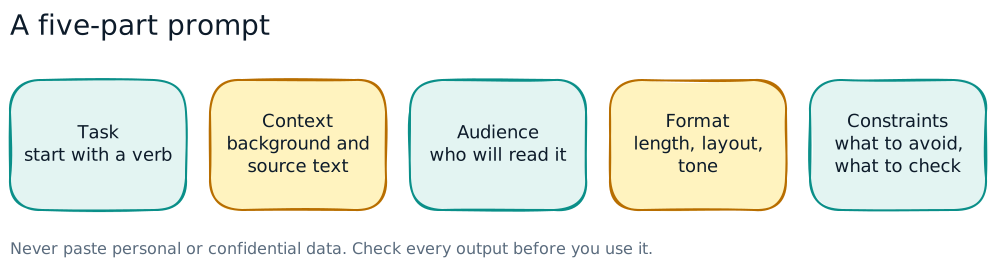
Most weak AI output comes from a weak brief. Write a prompt the way you would brief a capable new colleague who knows nothing about your company:
- Task: what you want, starting with a verb. "Draft", "summarise", "compare", "list".
- Context: why you need it and the background the tool cannot know. Paste the source text where there is one.
- Audience: who will read it and what they care about.
- Format: length, structure, tone, language (English or Bahasa Malaysia), table or bullets.
- Constraints: what to avoid, what not to invent, and what to do if information is missing.
A useful last line for almost any prompt: "Use only the information I have given you. If something is missing or unclear, list it as a question instead of guessing."
Then iterate. Ask for a shorter version, a different tone or a table. Ask "What did you assume?" and "What should I check before sending this?" The first answer is a draft, not the deliverable.
The prompts below use square brackets for the parts you fill in. They work in ChatGPT, Copilot, Gemini or Claude, so use whichever tool your company has approved.
Safe-use rules before you copy any prompt
- Use the approved tool and account. A company-licensed tool with data controls is not the same as a personal free account.
- No personal or confidential data unless the tool is approved for it: no IC numbers, salaries, medical details, customer lists, contracts, passwords, source code or unreleased financials. Personal data in prompts is covered by the Personal Data Protection Act 2010. Replace names with roles ("Employee A", "Customer B") and remove identifiers before pasting.
- Check the output. AI can invent facts, figures, laws and citations confidently. Verify anything that leaves your hands against a source.
- Do not use it for final decisions about people. Hiring, discipline and performance ratings need human judgement and a fair process; AI can help draft, not decide.
- Follow your disclosure rule on when to say that AI helped.
If your company does not yet have these rules written down, start with our AI usage policy template.
Prompts for HR
1. Job advertisement. "Draft a job advertisement for a [role] in [city], Malaysia. Responsibilities: [paste]. Requirements: [paste]. Audience: experienced candidates on job portals. Format: a two-line summary, then responsibilities and requirements as bullets, under 300 words. Use inclusive, plain language and avoid age, gender or race preferences."
2. Interview questions. "Write 8 structured interview questions for a [role], based on these competencies: [list]. For each question, add what a strong answer would include. Avoid questions about marital status, religion, pregnancy or age."
3. Policy summary for staff. "Summarise the policy below for all staff in plain English, in no more than 200 words, then list the 5 things employees must do. Do not add rules that are not in the text. Policy: [paste policy with no personal data]."
4. Onboarding checklist. "Create a first-week onboarding checklist for a new [role] joining a [type of company]. Group items by day. Include safety induction, IT access, key contacts by role and the policies to read. Format as a table with columns: day, item, owner role."
5. Translation for staff notices. "Translate this staff notice into Bahasa Malaysia for factory employees. Keep it simple and polite. Keep dates, times and numbers exactly as written. Notice: [paste]."
6. Training needs survey. "Draft a 10-question anonymous survey to identify training needs for [department]. Mix multiple-choice and two open questions. Keep it under 5 minutes to complete."
Prompts for admin and office work
7. Meeting notes to actions. "Turn these meeting notes into minutes with three sections: decisions, action items (owner, due date) and open questions. Use only what is in the notes; mark any action with no owner as 'owner TBC'. Notes: [paste]."
8. Polite reminder email. "Write a short, polite reminder email to [role] about [overdue item], due on [date]. Tone: friendly but clear. Under 120 words, with a subject line."
9. Reply to a long email. "Here is an email I received. Summarise what the sender is asking for in three bullets, then draft a reply that answers each point. Where I need to supply information, leave [brackets]. Email: [paste, with names removed]."
10. Standard operating procedure. "Write a step-by-step procedure for [task] based on my notes below. Number the steps, start each with a verb, and add a 'before you start' list and a 'common mistakes' list. Notes: [paste]."
11. Event or training logistics. "Create a planning checklist for a half-day internal training for [number] staff in [location]. Cover venue, equipment, catering with halal and vegetarian options, attendance records and follow-up. Format as a table with deadline weeks before the event."
12. Rewrite for clarity. "Rewrite this paragraph so a busy reader understands it in one pass. Keep every fact and number. Shorter sentences, no jargon. Then list any changes in meaning you were unsure about. Text: [paste]."
Prompts for sales and customer service
13. Follow-up after a meeting. "Draft a follow-up email to a prospect after a meeting about [product or service]. Points discussed: [list]. Next step: [step]. Under 150 words, professional and warm, no exaggerated claims."
14. Handling an objection. "A customer says: '[objection]'. Give me three honest ways to respond, each in two or three sentences, based only on these facts about our offer: [facts]. Do not promise anything not in the facts."
15. Product description. "Write a 100-word product description for [product] for [audience]. Features: [list]. Only use the features given; do not add environmental or health claims."
16. Complaint reply. "Draft a reply to this customer complaint. Acknowledge the problem, apologise without admitting legal liability, explain the next step [step] and the timeline [timeline]. Calm and respectful, under 150 words. Complaint: [paste, with customer details removed]."
17. Call preparation. "I have a call with a [type of company] in the [industry] sector about [topic]. List 8 good discovery questions and the 3 most likely concerns they will raise. Do not invent facts about the company."
18. FAQ from support tickets. "Here are anonymised customer questions from the last month. Group them into themes, count how often each appears, and draft a short FAQ answer for the top 5 using only the information in our policy: [paste questions and policy]."
Prompts for finance
19. Explain a variance. "Here is a table of budget versus actual by cost centre for [month]. Identify the five largest variances, calculate each as an amount and a percentage, and draft one neutral sentence for each that I can complete with the reason. Show your calculations. Data: [paste anonymised table]."
20. Spreadsheet formula. "In Excel, column A has invoice dates and column B has amounts. Write a formula that sums amounts for [month and year]. Explain how it works and how to test it on three rows."
21. Management report commentary. "Draft a half-page commentary on these monthly results for the management committee. Structure: headline, three key movements, risks, actions. Use only these figures and do not round them differently: [paste]."
22. Process checklist. "Create a month-end close checklist for a small finance team, grouped by day 1 to day 5, with columns for task, owner role and evidence kept."
23. Explain a standard or term. "Explain [accounting term or concept] in plain English for a non-finance manager, with one simple example. Then tell me which official source I should check to confirm the details."
24. Reconcile two lists. "Compare list A and list B below. Show items in A but not B, in B but not A, and items in both with different amounts. Present as three tables. Do not drop any rows. [paste both lists, no account numbers]."
For more guided finance work, see the Bank Reconciliation Workbook and the Management Report Outline Workbook.
Prompts for HSSE
25. Toolbox talk. "Write a 5-minute toolbox talk on [hazard, e.g. working at height] for construction workers in Malaysia. Include: why it matters, three key rules, one short real-type scenario and two questions to ask the crew. Simple English, under 400 words." (See our toolbox talk topics for ideas.)
26. Hazard brainstorm. "List the hazards for this task: [describe task, location, equipment]. For each, suggest controls following the hierarchy of controls (elimination, substitution, engineering, administrative, PPE). Format as a table. I will check this against our site HIRARC." (See our HIRARC guide.)
27. Incident report clean-up. "Rewrite these incident notes into a clear factual description: what happened, when, where, who was involved by role, immediate actions. Do not add causes or blame. Notes: [paste, names removed]."
28. Root cause questions. "Based on this incident description, suggest 10 investigation questions covering people, equipment, procedure and environment, and a 5 Whys starting point. Do not conclude the root cause. Description: [paste]."
29. Safety poster text. "Write three short safety poster slogans and a one-line explanation each, in English and Bahasa Malaysia, about [topic]. Positive tone, under 10 words per slogan."
30. Checklist from a procedure. "Turn this procedure into a pre-task checklist with yes/no items that a supervisor can sign. Keep every safety-critical step. Procedure: [paste]."
AI is a drafting aid for HSSE, not a competent person. Every risk assessment, permit and legal interpretation still needs review by the responsible person on site.
Prompts for managers
31. Feedback conversation plan. "Help me prepare a feedback conversation with a team member about [behaviour, described factually]. Give me an opening line, three specific observations I can make, two questions to understand their view and a way to agree next steps. Respectful and direct."
32. Team update. "Turn these bullet points into a short weekly update for my team: wins, priorities for next week, blockers. Under 200 words, encouraging but factual. Points: [paste]."
33. Decision paper. "Draft a one-page decision paper on [decision]. Sections: background, options (at least three, including do nothing), pros and cons, costs, risks, recommendation. Use only the facts below and list any information I still need. Facts: [paste]."
34. Workshop agenda. "Create a 2-hour workshop agenda for [number] people on [topic]. Include timings, an icebreaker, two group activities and a closing action list."
35. Risk check on a plan. "Here is my project plan. List the ten biggest risks, rate each high, medium or low for likelihood and impact, and suggest one mitigation each. Plan: [paste]."
36. Check my own draft. "Review my draft below as a sceptical reader. What is unclear, what claims need evidence, and what might upset the audience? Do not rewrite it; give me a numbered list of issues. Draft: [paste]."
Reuse what works, and keep learning
The biggest time saving comes from not starting from scratch. When a prompt gives a good result, save it with a name, the date, which tool you used and an example of good output. Share it in a team folder and improve it as you learn.
Free WorkQuest2U workbooks help you plan this: the My AI Safety Plan Workbook for safe everyday use, the AI Workflow Planning Workbook for turning a repeat task into a reviewed routine, and the Data Science Prompt Pack with prompts for each step of analysis work (also in Bahasa Malaysia).
To practise, start with Prompting Essentials, then Checking & Improving AI Results and Reuse Your Best Prompt. Each is a short 3D scene where staff write and fix briefs, catch a made-up figure and build a reusable template, followed by a quiz. For a full programme, see our guide to AI training for employees.
Free AI Workflow Planning Workbook
A printable worksheet to turn a repeat task into a reviewed AI-assisted routine: inputs, approved sources, output checks, approver and fallback. Practise with fictional information.
Practise it in WorkQuest2U
Short 3D lessons where staff walk the scene, spot the issues and make the calls. Free to try, with certificates and progress records for companies.
 AI for EveryonePrompting EssentialsTurn a vague request into a useful work brief: task, context, audience, format, examples and follow-up instructions.AI for EveryoneChecking & Improving AI ResultsDiagnose weak answers, verify claims, preserve facts during revision and decide when a result needs human expertise.AI for EveryoneReuse Your Best PromptTurn a prompt that works into a tested, versioned template, project or instruction pack that anyone can run safely.
 AI for EveryoneUsing Generative AI SafelyA KL tower office: approved AI tools, what never to paste, hallucinations, copyright and bias, AI for code, prompt injection, labelling and human accountability.AI for EveryoneData Protection for AIProtect personal and confidential information across prompts, documents, retrieval, memory, service settings, logs and outputs.AI for EveryoneAI for Everyday ProductivityPractise emails, summaries, meeting actions, planning, brainstorming and translation with realistic work briefs.
Frequently asked questions
What are good ChatGPT prompts for work?
Do these prompts work in Copilot, Gemini or Claude?
Is it safe to paste work documents into ChatGPT?
How do I stop ChatGPT making things up?
Can I write prompts in Bahasa Malaysia?
Sources
- Personal Data Protection Commissioner (JPDP)
- MOSTI: National Guidelines on AI Governance and Ethics (AIGE)
This guide is general information for workplaces in Malaysia, checked against the sources above on 30 October 2026. It is not legal advice; laws and guidelines change, so confirm the current text before you act.