AI for data analysis: cleaning, summarising and charting spreadsheets with ChatGPT, Copilot, Gemini or Claude
AI assistants such as ChatGPT, Microsoft Copilot, Google Gemini and Claude can clean, summarise and chart spreadsheet data in minutes, but they can miscount, invent figures and mishandle personal data. Use an approved tool, share only the data the task needs, ask the AI to show its method, and check its numbers against the source before anyone relies on them.

What AI can and cannot do with your data
Most workplace AI assistants can now read an uploaded spreadsheet or CSV and work on it: Microsoft Copilot inside Excel, Gemini inside Google Sheets, and ChatGPT and Claude when you attach a file. Many run code behind the scenes to do the counting, which is more reliable than a model guessing numbers from text.
Good uses:
- Profiling a file: how many rows, which columns, what is missing, what looks odd.
- Cleaning: standardising dates, names and categories, and flagging duplicates.
- Writing formulas, pivot tables, SQL or Python you can reuse.
- Summarising results in plain language for a manager.
- Suggesting the right chart for a question, and drafting it.
Weak spots:
- Silent errors: dropping rows on import, misreading a date format, or treating a number stored as text as zero.
- Invented detail: a confident figure, column or trend that is not in the data.
- No business context: it does not know that March had a stock-take, or that one branch changed its system.
- Correlation read as cause: "sales rose after the campaign" is not proof the campaign caused it.
Treat AI as a fast junior analyst whose work you review, not as the final answer. The Data Basics Before You Ask AI lesson shows how to prepare a tidy, minimal extract first.
Before you upload: PDPA and company rules
Pasting a staff list or customer export into an AI tool is processing personal data, and Malaysia's Personal Data Protection Act 2010 applies to personal data processed in commercial transactions. The practical rules:
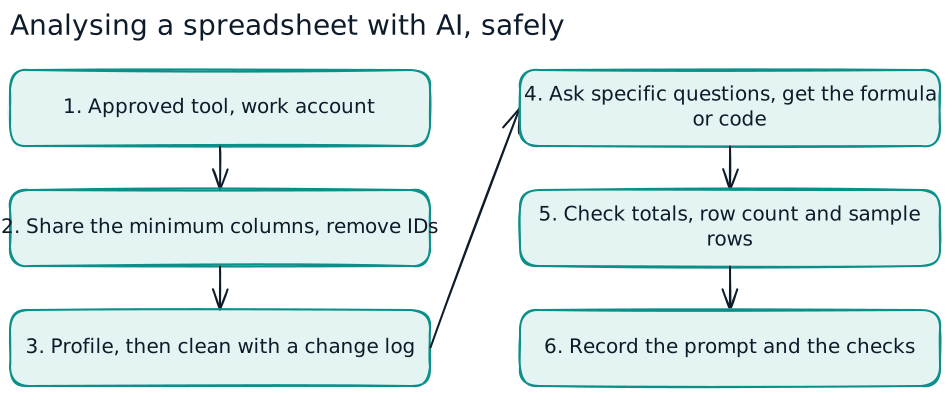
- Approved tool, work account. Use only the AI tools and accounts your company has approved for that class of data. Personal or free accounts may keep or use your inputs in ways your company has not agreed to.
- Minimum data. Share only the columns the question needs. Totals by branch rarely need names, IC numbers, phone numbers or addresses.
- De-identify where you can. Replace names and IDs with codes, group ages into bands, and hide small counts that could point to one person.
- Same purpose. Use the data only for a purpose consistent with what people were told when it was collected.
- Sensitive data. Health, biometric and other sensitive personal data need extra care and usually should not go into a general assistant at all.
- Transfers abroad. Many AI services process data outside Malaysia. Under section 129 of the PDPA, the controller must have a lawful basis for the transfer; your company's data protection officer should already have assessed the approved tools.
Confidential business data, such as unreleased results, pricing, contracts or customer lists, needs the same care even when it holds no personal data. If your company has an AI usage policy, follow it; if it does not, see our AI usage policy template. The Data Protection for AI lesson covers prompts, files, memory, logs and outputs.
Cleaning data with AI
Messy exports are where AI saves the most time, and where it can do the most quiet damage. A safe routine:
- Keep the original untouched and work on a copy.
- Ask for a profile first: row count, columns and types, blanks, duplicates, and values that look wrong.
- Agree the rules before any changes: which date format, how to spell branch names, what counts as a true duplicate.
- Ask for a change log: every rule applied and how many rows it touched.
- Mark gaps rather than letting the AI fill them with guesses.
- Check the row count before and after. If 4,812 rows went in and 4,790 came out, find out why.
Practise this in Cleaning Data with AI, a short 3D scene with a fictional sales export, and plan a real job with the free Data Cleaning Plan Workbook.
Summarising, analysing and charting
Once the data is clean, ask specific questions with the audience in mind. "Analyse this" gives generic output; "Which five products lost the most margin between Q2 and Q3, and by how much?" gives something you can check.
Prompts that work:
- "Using only the attached file, give total sales and gross margin by branch for July to September. Show the formula or code you used and the row count included."
- "Build a pivot table of overtime hours by department and month. List any department above 15% of total hours."
- "Suggest the best chart to compare monthly sales for five branches, and explain why. Start the y-axis at zero."
- "Write a three-sentence summary for the operations manager. State what the data cannot tell us."
For charts, ask for the plain choices: bars for comparing categories, lines for trends over time, and no 3D effects or truncated axes that exaggerate a change. The Analysing a Spreadsheet with AI lesson takes a fictional sales file through margins, pivots, honest charts and the limits of the data. The free Spreadsheet Analysis Workbook helps you plan a real one.
Checking AI outputs before anyone uses them
The single most important habit. Before a number goes into a report or a decision:
- Tie totals back to the source: the grand total in the AI's summary should match a SUM in the original file.
- Check the row count the AI says it used.
- Spot-check three to five rows by hand, including an extreme value.
- Rerun the formula or code yourself, in the spreadsheet or notebook, rather than trusting the chat text.
- Ask what it assumed: date ranges, filters, how blanks were treated.
- Sense-check against what you know: a 300% jump in a stable product line is more likely an error than news.
Keep a short record of the prompt, the file version and the checks done, so a reviewer can follow the work later. Prompting Patterns for Data Work covers prompts that give checkable answers, and Example Prompts for Every Step gives a worked prompt and the matching check for each stage of an analysis.
When to call a data scientist
AI in a spreadsheet covers a lot of everyday reporting. Bring in a data scientist or analytics team when the work involves:
- Prediction: forecasting demand, scoring churn or estimating risk, where the model must be tested on data it has not seen.
- Cause and effect: deciding whether a campaign, price change or training programme actually caused a result.
- Large or linked data: millions of rows, several systems joined together, or data that refreshes every day.
- Decisions about people: hiring, promotion, credit, pricing for individuals or anything that could be unfair to a group.
- Anything that will run repeatedly in production, where errors compound and someone must monitor it.
A data scientist will frame the question, check bias and leakage, measure the model honestly and document its limits. AI tools help them too, but the judgement is the job.
Build the skill across your team
The quickest gains come from a few shared habits: a tidy extract, an approved tool, specific prompts, and a check before anything is used. Save prompts that work as team templates with the date, the tool and an example of good output; see ChatGPT prompts for work for the general pattern.
For deeper practice, the AI for Data Science topic on WorkQuest2U takes staff from framing a question through exploring, preparing and modelling data to communicating results, with lessons where you practise each step in a 3D scene and a completion certificate at the end. It is available in English and Bahasa Malaysia, and the free Data Science Prompt Pack (also in Bahasa Malaysia) gives prompts for every step. For broader AI skills across the workforce, see AI training for employees.
Free Spreadsheet Analysis Workbook
A printable worksheet to plan an AI-assisted analysis: the question, data source and row count, formulas, pivot layout, chart choice, insights with exact figures and what the data cannot answer. Practise with fictional information.
Practise it in WorkQuest2U
Short 3D lessons where staff walk the scene, spot the issues and make the calls. Free to try, with certificates and progress records for companies.
 AI for EveryoneData Basics Before You Ask AIPrepare a tidy, well-labelled and minimal data extract so an AI assistant can work with it reliably and safely.AI for EveryoneCleaning Data with AIClean a messy sales export and a folder of files with AI: keep the original, remove true duplicates, fix dates and names, mark gaps and log every change.AI for EveryoneAnalysing a Spreadsheet with AITurn a fictional sales file and ad export into checked answers: margins, pivot tables, honest charts, campaign roll-ups and the limits of the data.
 AI for Data SciencePrompting Patterns for Data WorkPrompt patterns that give checkable answers in data work: the six-part recipe, schema not data, plan first, assumptions, iterating with real output, spotting inventions and keeping a record.AI for Data ScienceExample Prompts for Every StepA worked prompt for each step of a data project, from profiling to debugging: what a good answer looks like, the check you then run, and how to keep the best prompts as owned, versioned templates.AI for EveryoneData Protection for AIProtect personal and confidential information across prompts, documents, retrieval, memory, service settings, logs and outputs.
Frequently asked questions
Can ChatGPT analyse Excel files?
Is it safe to upload company data to an AI tool?
How accurate is AI for data analysis?
Can AI clean messy data?
Will AI replace data analysts?
Sources
- Personal Data Protection Act 2010 [Act 709], Department of Personal Data Protection (JPDP)
- MOSTI: National Guidelines on AI Governance and Ethics (AIGE)
This guide is general information for workplaces in Malaysia, checked against the sources above on 30 October 2026. It is not legal advice; laws and guidelines change, so confirm the current text before you act.