Ransomware attack: what to do in the first hour, and after
In a ransomware attack, isolate affected systems from the network without switching them off, preserve evidence, call your incident response provider and activate your plan. Report to MyCERT’s Cyber999 and the police, notify the PDP Commissioner if personal data is involved, and meet the Cyber Security Act 2024 clock if you are an NCII entity. Then restore from clean, tested backups.

What a ransomware attack looks like now
Ransomware is malware that encrypts files and systems so they cannot be used, followed by a demand for payment to unlock them. Modern attacks usually add a second threat: the attackers copy data out first and threaten to publish it if you do not pay. Restoring from backup fixes the first problem but not the second.
MyCERT, the Malaysia Computer Emergency Response Team run by CyberSecurity Malaysia, has reported exactly this trend: attackers stealing sensitive data and holding it hostage until the organisation pays. MyCERT said businesses are the most affected by ransomware in Malaysia, with Active Directory servers the main target, because controlling the directory lets an attacker reach every connected machine.
Most attacks start long before the ransom note. Common entry points are a phishing e-mail, a stolen or reused password on a remote access service, an unpatched internet-facing system, or a contractor’s account. Attackers then spend days or weeks moving around, disabling security tools and finding the backups. The ransom note is the end of the attack, not the start.
The first hour: contain and preserve
| Step | What to do | Why |
|---|---|---|
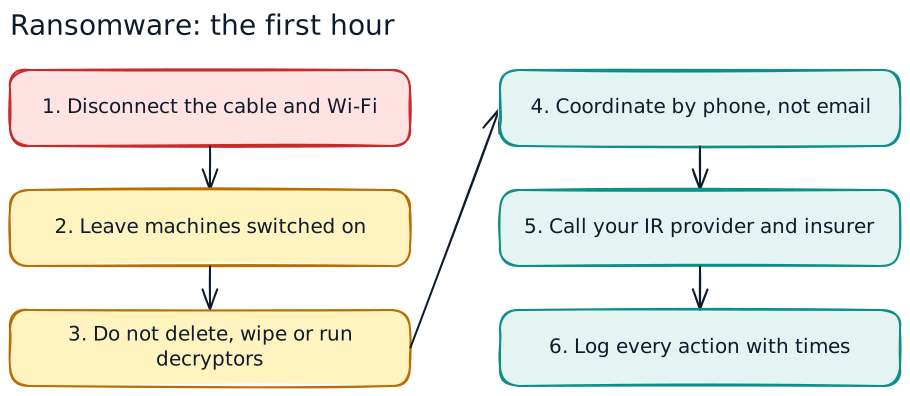
| 1. Isolate | Unplug the network cable and turn off Wi-Fi on affected machines. If many systems or a whole site are hit, IT may take that network segment offline at the switch. | Stops the encryption and the attacker spreading to more systems. |
| 2. Don’t power off | Leave machines on unless there is no other way to disconnect them. | Memory holds evidence that a shutdown destroys. |
| 3. Don’t clean up | Do not delete files, wipe machines, reinstall or run random “decryptor” tools. | Investigators need the logs, the ransom note and the malware samples. |
| 4. Use a separate channel | Coordinate by phone or a pre-agreed out-of-band channel. | The attacker may be reading your e-mail and chat. |
| 5. Call for help | Activate your incident response plan and call your incident response (IR) provider and, if you have one, your cyber insurer’s hotline. | Your policy may set conditions on which provider you use and how fast you notify. |
| 6. Start a log | Write down what was seen, when, by whom, and every action taken. | Regulators, insurers and the police will ask for a timeline. |
For staff outside IT, the rule is shorter: disconnect, don’t switch off, report immediately. The Ransomware & Cyber Incident Response lesson puts staff on a floor under attack in a 3D scene, from the first ransom note through the SOC and the crisis room.
Who to report to in Malaysia
Several reporting duties can apply at once, each with its own clock. Map them in your plan before you need them.
- MyCERT Cyber999. CyberSecurity Malaysia’s incident help centre takes reports through the Cyber999 online form and mobile app, by e-mail, and by phone (1-300-88-2999 in office hours, or +6019-266 5850 around the clock). It can help with analysis and coordination. Reporting is voluntary for most organisations, but it helps.
- Police. Ransomware is a crime. Lodge a police report; your insurer and bank are likely to ask for one.
- PDP Commissioner (PDPA). If personal data may have been accessed or stolen, section 12B of the PDPA, in force since 1 June 2025, requires the data controller to notify the Commissioner as soon as practicable. The Commissioner’s guideline sets an outer limit of 72 hours where the breach causes or is likely to cause significant harm or affects more than 1,000 data subjects, with notice to affected individuals within 7 days of that where significant harm is likely. See Data breach notification in Malaysia.
- NACSA and your sector lead (Cyber Security Act 2024). If you are a designated national critical information infrastructure (NCII) entity, notify immediately on becoming aware, give initial details within 6 hours and supplementary information within 14 days. See Cyber Security Act 2024.
- Sector regulators and customers. Licensed financial institutions, listed companies and others may have further reporting or disclosure duties, and your contracts may require you to notify customers within a set time.
Restoring from backups safely
Backups decide whether a ransomware attack is a bad week or a crisis. But attackers know this, and they look for backups to delete or encrypt first.
- Keep at least one copy offline or immutable, so that an attacker with admin rights on the network cannot reach it.
- Encrypt backups, since stolen backup files are a data breach too.
- Test restores regularly. A backup you have never restored is a hope, not a plan. Time how long a full restore of each critical system takes.
- Restore in priority order: identity and directory services, then the systems that run critical operations, then the rest. Agree this order in advance with the business.
- Make sure the attacker is out first. Rebuild compromised servers from clean images, reset passwords and keys, especially admin and service accounts, and close the entry point. Restoring onto an infected network just starts the attack again.
- Check the backup date. If the attacker was inside for weeks, recent backups may contain their tools. Your IR provider can help pick a clean restore point.
Recovery Readiness & Backup Drills walks through an outage drill: picking critical services, protected backups and safe restoration.
Should you pay the ransom?
CyberSecurity Malaysia’s chief executive, Datuk Dr Amirudin Abdul Wahab, has said the agency’s answer will always be no, because paying rewards the attackers. There are practical reasons too:
- Payment does not guarantee a working decryptor, and decryption can be slow and incomplete.
- Stolen data may still be published or sold, and you may be asked to pay again.
- Paying marks you as a target that pays.
- Payment may raise legal questions, for example if the recipients are sanctioned, and does not remove your duty to notify regulators.
The decision belongs to the board or crisis team, with legal counsel, the insurer and the IR provider, not to the person who found the note. Decide your organisation’s position and who has authority before an attack. Never open negotiations or reply to the attackers on your own.
Whatever is decided, record who decided, when, on what information and with what advice. Regulators, auditors, insurers and the police may ask later, and a clear record protects the people who had to make a hard call under pressure. Paying, or choosing not to, also does not end the incident: the investigation, the notifications and the rebuild still have to happen.
Prepare: plan, protect and run a tabletop exercise
- Write the plan: who leads, who decides, who calls the IR provider, insurer, Cyber999, the police, the PDP Commissioner and, if NCII, NACSA. Print it; your shared drive may be encrypted.
- Close the common doors: MFA on remote access, e-mail and admin accounts, prompt patching of internet-facing systems, and removal of old accounts. See strong password and MFA at work.
- Protect backups as described above, and test a restore at least once a year.
- Train staff to report a suspicious e-mail or odd behaviour early. Most attacks begin with a click. See phishing awareness training.
- Run a tabletop exercise. Walk management through a scenario hour by hour: the ransom note at 2 a.m., the data leak threat, the 72-hour PDPA clock, the customer calls, the media. Note every gap and fix it.
- Review after every incident or drill, and update the plan.
The NACSA & the Cyber Security Act lesson covers the national reporting side, and Phishing & Social Engineering the everyday habits that keep attackers out.
This guide is general information as of October 2026, not legal or technical advice for a live incident. In a live incident, follow your plan and your IR provider.
Practise it in WorkQuest2U
Short 3D lessons where staff walk the scene, spot the issues and make the calls. Free to try, with certificates and progress records for companies.
 Cybersecurity & Data ProtectionRansomware & Cyber Incident ResponseA floor under ransomware attack: early signs, the first minutes, the SOC, backups, the crisis room, communications and lessons learned.
 Cybersecurity & Data ProtectionRecovery Readiness & Backup DrillsWork through an outage drill: critical services, recovery needs, protected backups, safe restoration and communications.
 Other Regulators: Content, Data & CyberNACSA & the Cyber Security ActA national cyber security operations room during a joint exercise: NACSA, the National Cyber Security Committee, NCII sectors and leads, codes of practice, risk assessments, audits, incident notification and licensed providers.
 Cybersecurity & Data ProtectionPhishing & Social EngineeringA tower lobby and office floor: pretexting, tailgating, phishing emails, checking links, vishing, SMS and WhatsApp scams, QR-code phishing and what to do if you clicked.
 Cybersecurity & Data ProtectionPasswords, MFA & IdentityA digital shared-services hub: passphrases and password managers, MFA and push-fatigue attacks, one-time codes, recovery scams, least privilege, access reviews and locked screens.
Frequently asked questions
What should I do first in a ransomware attack?
Where do I report a ransomware attack in Malaysia?
Is a ransomware attack a PDPA data breach?
Should we pay the ransom?
Why not switch off the infected computer?
Sources
- MyCERT (CyberSecurity Malaysia): Cyber999 reporting channels
- The Star: MyCERT, Malaysia data breaches up 29% in Q1 2025 (ransomware trends)
- The Star: Companies hit by ransomware discouraged from paying, says CyberSecurity Malaysia (19 Jun 2023)
- NACSA: Cyber Security Act 2024 legal documents
- JPDP: Data Breach Notification (DBN) reporting
- CISA (United States): #StopRansomware Guide, response checklist and backups
This guide is general information for workplaces in Malaysia, checked against the sources above on 30 October 2026. It is not legal advice; laws and guidelines change, so confirm the current text before you act.